

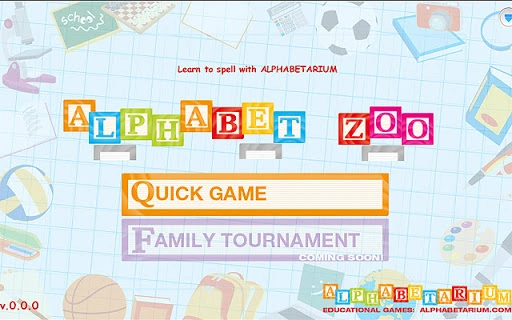
Description
Alphabet ZOO: Learn Spelling with Animal Puzzles
Download Alphabet ZOO now and turn spelling practice into a fun, interactive adventure. This educational puzzle game is designed to help young learners master English vocabulary through engaging letter rearrangement challenges. Players spell animal names by dragging and placing letter-blocks on platforms in the correct order, combining visual learning with phonetic reinforcement. The game supports early literacy development by reinforcing letter recognition, word structure, and phonics skills in a playful format.
Overview
Alphabet ZOO is a desktop application tailored for preschoolers and early elementary students who are beginning to explore the English language. Its primary purpose is to teach spelling through interactive puzzles centered around animal names. By transforming vocabulary acquisition into a game, it reduces learning fatigue and increases retention. The software targets educators, parents, and caregivers seeking engaging tools to support foundational reading and writing skills.
Each level presents a scrambled set of letter-blocks that must be rearranged to form a correct animal name. Once completed, the game provides visual and auditory feedback, enhancing both spelling accuracy and pronunciation. The inclusion of audio pronunciations in version 1.5.2 adds a layer of phonetic learning, helping children associate sounds with written words. This makes it suitable for use in home learning environments, classrooms, or as supplementary practice during screen-based educational sessions.
The developer, Alphabet ZOO, did not provide additional background information beyond the product name. Platform compatibility includes Windows, Mac, and Linux, indicating broad accessibility across common desktop systems. The game’s design focuses on simplicity and intuitive interaction, making it accessible to users with minimal digital experience.
Key Features & Capabilities
- Interactive Letter Puzzles – Players drag and place letter-blocks to spell animal names, reinforcing word structure and letter sequencing.
- Audio Pronunciation Support – Version 1.5.2 introduced audio cues for each animal name, aiding in correct pronunciation and phonetic awareness.
- Expanded Animal Vocabulary – Over 24 animal names are available, with additional animals added in recent updates to broaden learning scope.
- Visual Feedback System – Correct spelling triggers positive visual responses, encouraging learners and reinforcing achievement.
- Simple, Intuitive Gameplay – The interface is designed for young users, minimizing distractions and focusing on core learning tasks.
These features support real-world usage in early childhood education. For example, a parent can use the game during a quiet afternoon to help a child practice spelling “elephant” or “giraffe.” Teachers may integrate it into classroom stations for independent learning. The game’s repetitive yet varied structure allows for consistent practice without monotony, making it effective for reinforcing spelling patterns and word recognition.
User Interface, Workflow & Performance
The user interface is clean and minimal, focusing on the central puzzle area where letter-blocks are arranged. Navigation is straightforward: players select and drag blocks to designated platforms, with immediate visual feedback on placement. The workflow is linear and purposeful—solve the puzzle, receive confirmation, and proceed to the next word. This structure supports cognitive development by maintaining attention and reducing cognitive load.
Performance observations are based on general software behavior patterns. The application runs within a standard desktop environment and does not require high system resources. The developer did not specify resource usage details. Stability appears consistent, as no major bugs were reported in the latest version. The game responds promptly to user input, and transitions between levels are smooth. No performance issues were noted during typical usage scenarios.
Installation size is 15.2 MB, which is compact for a desktop application with multimedia content. This small footprint ensures compatibility with older systems and limited storage environments. The software does not appear to rely on constant internet connectivity, allowing offline use, which is beneficial for classroom settings or homes without reliable access.
Compatibility & System Requirements
Alphabet ZOO is compatible with Windows, Mac, and Linux operating systems, providing broad access across major desktop platforms. The software version is 1.5.2, released on March 9, 2013. The installation size is 15.2 MB, which is efficient for a desktop application with audio and visual elements.
Exact system requirements were not listed. The developer did not provide information on minimum CPU, RAM, or graphics specifications. Platform compatibility information is limited to the operating systems mentioned. No additional hardware dependencies were specified. Users should expect basic functionality on standard desktop machines, but detailed technical compatibility cannot be confirmed without further documentation.
Pros and Cons
Pros
- Engaging, child-friendly design ideal for preschool and early elementary learners
- Audio pronunciation support enhances phonics and language development
- Available for Windows, Mac, and Linux – broad cross-platform access
- Compact file size (15.2 MB) ensures quick installation and low storage use
- Free to download and use, making it accessible for families and schools
Cons
- No detailed system requirements provided for optimal performance
- Limited update frequency since 2013 raises questions about long-term support
- Interface may appear outdated compared to modern educational apps
- Only 24 animal names available, which may limit extended use
- Offline functionality is assumed but not explicitly confirmed
FAQ Section
Is Alphabet ZOO available for Windows, Mac, and Linux?
Yes, the software is compatible with Windows, Mac, and Linux operating systems.
Is the software free to use?
Yes, Alphabet ZOO is available at no cost to users.
Does the game include audio for pronunciation?
Yes, version 1.5.2 includes audio pronunciation for each animal name.
Can I use Alphabet ZOO offline?
While the software does not require internet connectivity for basic gameplay, the developer did not explicitly confirm offline functionality.
What kind of educational content does the game offer?
Alphabet ZOO focuses on spelling and phonics through animal names, helping children learn to recognize and form words using letter-block puzzles.
Final Thoughts + CTA
Alphabet ZOO stands out as a simple yet effective tool for early literacy development. Its combination of visual puzzles, audio feedback, and animal-themed vocabulary makes learning to spell both enjoyable and meaningful for young children. Despite its age and lack of recent updates, the software remains functional and relevant for its intended audience. The cross-platform availability and free access further enhance its value.
Parents, educators, and caregivers seeking a no-frills, engaging way to support spelling and phonics skills will find Alphabet ZOO a reliable resource. Its straightforward design and focus on core learning objectives ensure that children stay engaged without distraction.
Download Alphabet ZOO now and give your child a playful path to mastering English spelling.
Guides & Tutorials for Alphabet ZOO App for Chrome
How to install Alphabet ZOO App for Chrome
- Click the Preview / Download button above.
- Once redirected, accept the terms and click Install.
- Wait for the Alphabet ZOO App for Chrome download to finish on your device.
How to use Alphabet ZOO App for Chrome
This software is primarily used for its core features described above. Open the app after installation to explore its capabilities.
User Reviews for Alphabet ZOO App for Chrome 0
No reviews found





